 StaffBee
Salary from attendance, not from memory.
At month end StaffBee turns each person’s days into pay: present, half days, paid leave and absences, with your own earnings and deductions. You check it, approve it, and payslips reach staff.
Copying a month of register marks into a calculator is slow, and every mistake is a dispute.
Three steps, set up once.
- 1
Set each person’s salary
A monthly amount, and your salary structure: Basic, HRA, allowances, PF or anything else, as a fixed amount or a percentage.
- 2
Run payroll at month end
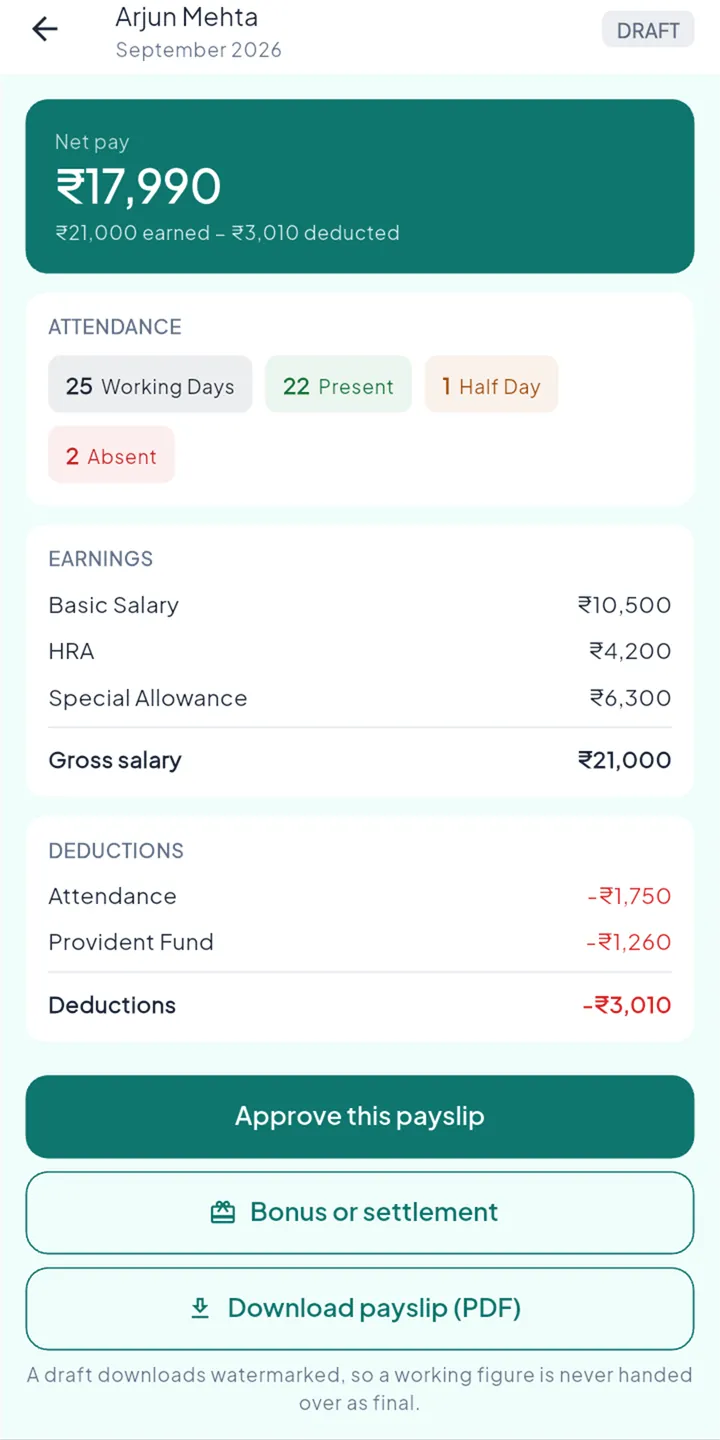
StaffBee counts the closed days and works out every payslip, showing how each figure was reached.
- 3
Approve and pay
Check each draft, approve it, mark it paid. Staff see their payslip and can download the PDF.
Every rupee, explained.
- Working, present, half and absent days on each slip
- Earnings and deductions by your own structure
- Bonuses and one-off settlements
- Payroll register as Excel or PDF
Their payslip, on their phone.
- Net pay and how it was worked out
- The days behind it
- A PDF to download and keep
The rules behind it.
Paid payslips never change
A correction after payment goes into the next month as an adjustment.
Drafts are marked as drafts
A draft downloads with a watermark, so a working figure is never mistaken for the final one.
Only the owner pays
Approving and paying payroll can’t be handed to anyone else.
Plain about compliance
PF, ESI or PT amounts follow the structure you set. Wage limits and state rules aren’t applied automatically yet.
Questions
How is a day’s pay worked out?
By the basis you choose: the month’s working days (for example ₹18,000 ÷ 26) or its calendar days.
Can I add a bonus or a one-off settlement?
Yes. Add it to the month’s payslip before you approve it.
Does StaffBee file PF or ESI returns?
No. StaffBee works out salary and payslips. Statutory filing stays with your accountant.